D2L Brightspace Tips: Custom Homepage Widgets to Display or Download Course Data
These custom widgets pull data directly from the course using the Brightspace API and either display the data in the widget or create a CSV file of the data. The HTML and JavaScript files for these widgets be found in the d2l-brightspace-widgets repository on GitHub.
Current Semester Courses
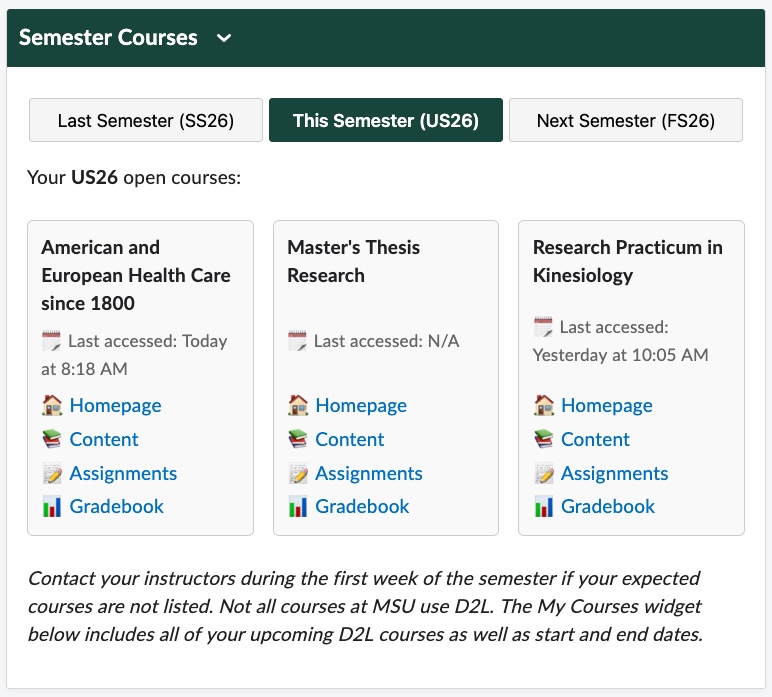
This widget is designed for the main D2L homepage rather than an individual course, based on the Student role at the organization level. The widget lists the student's open (active and within the start and end dates) semester courses - for last, this, and next semester - with direct links to each course's homepage, content, assignments, and gradebook as well as when the student last accessed the course. Semester start dates need to be updated in the code and the filters for semesters are based on the course code.
Course Reminders
Course details such as active status, start/end dates, if a syllabus has been added to Content, etc. to help instructors or instructional designers ensure the course is ready for students before the semester begins.

Course Materials
Simple checks if any items or activities have been added to the course yet.

Download Posts
Download all discussion posts in all forums and topics in CSV format with the click of a button.
